
I’ve never seen a Google search fail so badly as this: Consider the post at this link. Find some key words in it or even copy the title. Then go to Google and search for the post with your key words or copied title. Add “site:theincidentaleconomist.com” to your search terms to steer Google to TIE. Do you see the post in Google’s returned results? Me neither. I asked a few friends to try, and they couldn’t get Google to pull up that particular post either. I get just this:
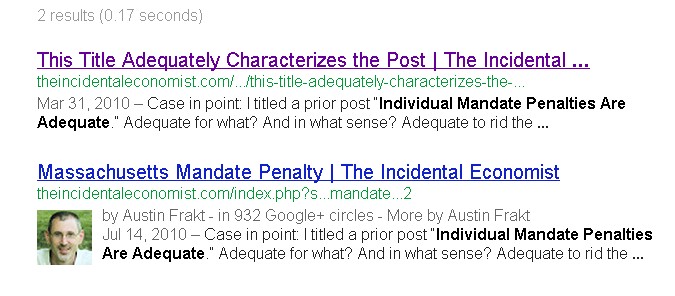
What’s going on here? It’s an old post. No way Google hasn’t indexed it. In fact, I’ve pulled it up via Google search many times in the past. And, though I can’t do a test search for all TIE posts, every other one I try to find via Google I easily do so. Anybody have a clue what the problem could be?
UPDATE: Bing, DuckDuckGo, and probably other search engines do find the post just fine. My interest in Google is principally driven by the fact that TIE’s own search box initiates a Google search. Plus, this is just weird, so I’d like to understand it.


by PC in SC on January 17th, 2013 at 21:39
I get the same thing w/ a Google search.
It works using Bing. Weird.
by Ken Hamer on January 17th, 2013 at 21:43
“Plus, this is just weird, so I’d like to understand it.”
O, that way madness lies…
by John B. Chilton on January 17th, 2013 at 23:27
It’s the fourth result google gives in my search. I highlighted the first paragraph, right clicked and executed a google search. The 3 results I get ahead of it have the paragraph verbatim.
[ridiculously long link deleted by editor]
by Austin Frakt on January 18th, 2013 at 06:08
I followed your long link (which anyone can reconstruct by copying the first paragraph). I did not see the post in question. I think you mistook it for another post.
by Brian Geppert on January 17th, 2013 at 23:55
Possible answer: I found a site that has a page with the same title and same slug. It’s returning a 404 for me, but it’s entirely possible that some spammer copied your post and then managed to be considered the source (so your version of the post would be suppressed as a duplicate). Just a guess.
by Austin Frakt on January 18th, 2013 at 06:06
URL please.
by rjs on January 18th, 2013 at 06:38
http://mattters.com/business/news/individual-mandate-penalties-are-adequate
a 404…
by Austin Frakt on January 18th, 2013 at 07:55
I’m not really understanding how this makes my page disappear in Google. You’d think this would be self-correcting since that page is a 404 and mine has content. Moreover, Bing and DuckDuckGo aren’t fooled.
by SAO on January 18th, 2013 at 09:07
I tried it and My first choice was The Incidental Economist with link to theincidentaleconomist.com/.
The second was About the Blog: About the blog | The Incidental Economist with a link to: theincidentaleconomist.com/about/
In short, it looked fine. Maybe to got fixed or maybe some American media giant referenced something that pushed clicks towards one article and the fact that I am overseas means I didn’t get adjusted to the popular link.
Google will, very annoyingly, give me steak houses in Moscow, Idaho, not Moscow, Russia unless I use Google.ru, which I never do, since Yandex is far better for cyrillic searches.
by John B. Chilton on January 18th, 2013 at 09:23
Thank you for your patience.
Right, my google search brought up this as the fourth result:
http://theincidentaleconomist.com/index.php?s=Massachusetts+mandate+penalty&paged=2
You wanted the search to identify the particular post
http://theincidentaleconomist.com/wordpress/individual-mandate-penalties-are-not-too-low/
by Brad August on January 18th, 2013 at 11:57
Your problem is probably based on permissions to the file. When you request the url for that post, your web server is returning a HTTP status code of 403 – forbidden. It also delivers the content of the page, so most web browser display it anyways.
Google might ignore indexing pages that are listed as forbidden due to privacy concerns.
by Austin Frakt on January 18th, 2013 at 14:11
And how do I change the file permissions?
by Brad August on January 18th, 2013 at 12:00
“Show me the research” is also returning a 403 status and is not indexed on Google
by Brad August on January 18th, 2013 at 14:33
I am sorry I cannot be of more help. I am not sure of your setup, but you should be able to google about wordpress and 403 errors.
Once you get you 403 problems worked out, then your current pages should start showing up on Google again.
by Austin Frakt on January 18th, 2013 at 15:05
It would help if I could reproduce the error. I never see a 403 error. Nobody else has ever reported to me that they do. How, exactly, do you see it? Under what circumstances?
by Theresa O'Connor on January 18th, 2013 at 15:35
If you download the Firebug plug-in for Firefox, activate Firebug inside Firefox and browse to that link, you should be able to see that the first request is coming back with a “403 Forbidden” response.
HTTP/1.1 403 Forbidden
Date: Fri, 18 Jan 2013 20:28:07 GMT
Server: Apache
X-Powered-By: PHP/5.2.17
Vary: Accept-Encoding,Cookie
Cache-Control: max-age=3, must-revalidate
WP-Super-Cache: Served supercache file from PHP
Content-Encoding: gzip
Content-Length: 15789
Keep-Alive: timeout=5, max=75
Connection: Keep-Alive
Content-Type: text/html; charset=UTF-8
Like another commenter said, browsers seem to be ignoring that response and serving up the content anyway, but Google seems to be getting that response and thinking it should ignore your page. I’m at a loss as to how you’re supposed to fix it though.
by Brad August on January 18th, 2013 at 15:38
Is is kinds of an invisible error. the 403 is a status code of the http request. Browsers do not show the user the status code. Even when a 403 status happens, then page still loads because the server has stilled returned the HTML, . The page appeared perfectly normal to me, but when I looked at the status code using a browser add-on; I could see the problem.
You can install an add-on in Firefox to view the status code. I used the add-on Firebug to see it, but it is a developer tool and not the easiest thing to use for a casual user. “Live HTTP Headers” is a pretty straight forward add-on you could use to view the status code.
The Chrome browser has built in developer tools that can also show you the HTTP headers and status.
This web service will also tell you the status returned for a URL, so it might be easier to use.
http://gsitecrawler.com/tools/Server-Status.aspx
Hope this helps point you in the right direction!